Lefebure
Lefebure NTRIP Client is the original app for getting correction from an NTRIP caster and down over Bluetooth. It's an oldie but a goodie.
Most GIS apps will not need Lefebure or Mock Location enabled and this section can be skipped.
The problem is that if Lefebure is connected to the FPL providing RTCM corrections over Bluetooth, then other GIS applications cannot use the same Bluetooth connection at the same time. That's where mock locations save the day. Lefebure can be setup to take over or mock the GPS location being reported by the phone. Nearly all GIS apps can use the phone's GPS location. So if the phone's location is magically super precise, then Lefebure can be the NTRIP Client and data provide, and your GIS app is none the wiser, and uses the phone's location.
Read how to Enable Mock Location.
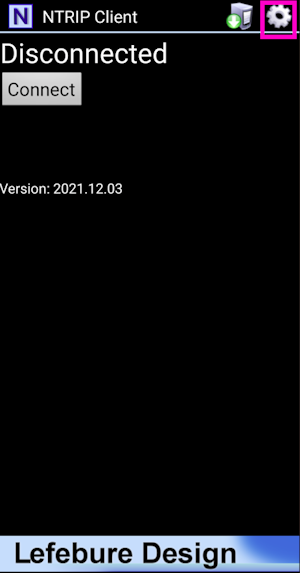
Once mock locations are enabled, click on the Settings gear in the top left corner.
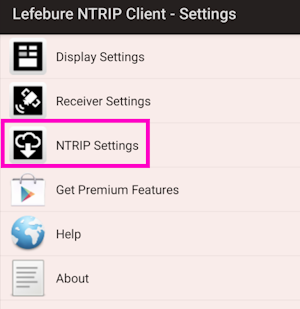
If needed, an NTRIP Client can be setup to provide corrections over Bluetooth to the FPL.
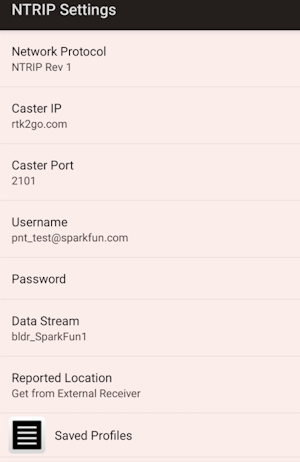
Enter the Caster information and hit the back button.
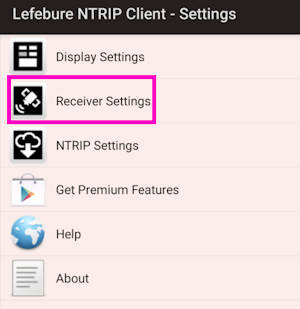
Select Receiver Settings.
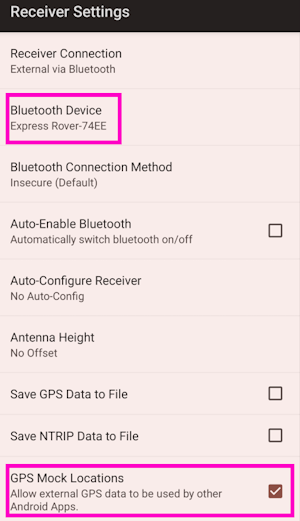
Select the FPL that has been paired over Bluetooth. Also enable Mock Locations. Hit the back button to return to the main screen.
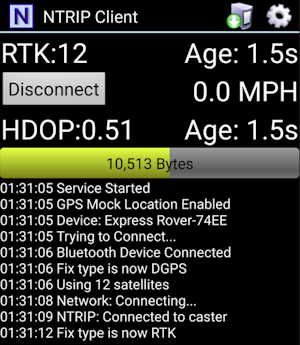
Press the Connect button. The app will connect to the NTRIP Caster. Now, any GIS app that selects Internal or Phone Location as its source will instead be fed the high precision NMEA being generated by the FPL connected over Bluetooth.