Equipment Overview
The TX2 is a compact all-band GNSS RTK rover designed to optimize your on-site workflow. Simply open your preferred GIS app on any mobile device, pair the TX2 as a BLE device, and access NTRIP corrections using the internet/cellular connection. With its MFi certification, users can now pair the TX2 with Apple's iOS devices! This entire kit ships in a hard-sided case, including additional accessories, and a sticker.
Parts List
The SparkPNT TX2 comes shipped inside a hard-sided carrying case with a few accessories to users get started. Below, is an overview of all the parts included with your purchase:

- Carrying Case
- SparkPNT TX2
- USB-C Cable
- USB-C Charger (65W)
- Thread Adapter (1/4" to 5/8")
Carrying Case
The TX2 comes with a hard-sided case that includes two holes for pad locks (with shackles up to 6mm in diameter).

We recommend limiting the shackle diameter to less than 6mm; a 1/4" (6.35mm) shackle will not fit without modifying the case.
TX2
The TX2 features a rugged aluminum and plastic enclosure, helical GNSS antenna, high-capacity battery, 5/8" threaded base, and minimal user interface. The user interface is limited to a single button, one USB port, and three LEDs. Users can find the USB-C connector, located beneath a rubber cover on the back of the device. The enclosure is IP67 waterproof, but only if this cover is fully closed.
Enclosure
The TX2 features a rugged enclosure made of a cast aluminum body with a plastic cover around its embedded helical antenna. The enclosure is IP67 rated and is waterproof to 1 meter, for up to 30 minutes, when the USB cover is closed.
The device should not be considered as IP67 waterproof, if the rubber cover for the USB-C port is open. The rubber cover needs to be fully closed for the enclosure to qualify for the IP67 ingress protection rating.

Antenna
Underneath its plastic cap, the TX2 features a specially tuned multi-frequency (L1/L2/L5) embedded helical antenna and 2.4GHz BLE/WiFi extension antenna.

Don't forget that GNSS signals are fairly weak and can't penetrate buildings or dense vegetation. The GNSS antenna should have an unobstructed view of the sky.
Antenna and North Reference Points
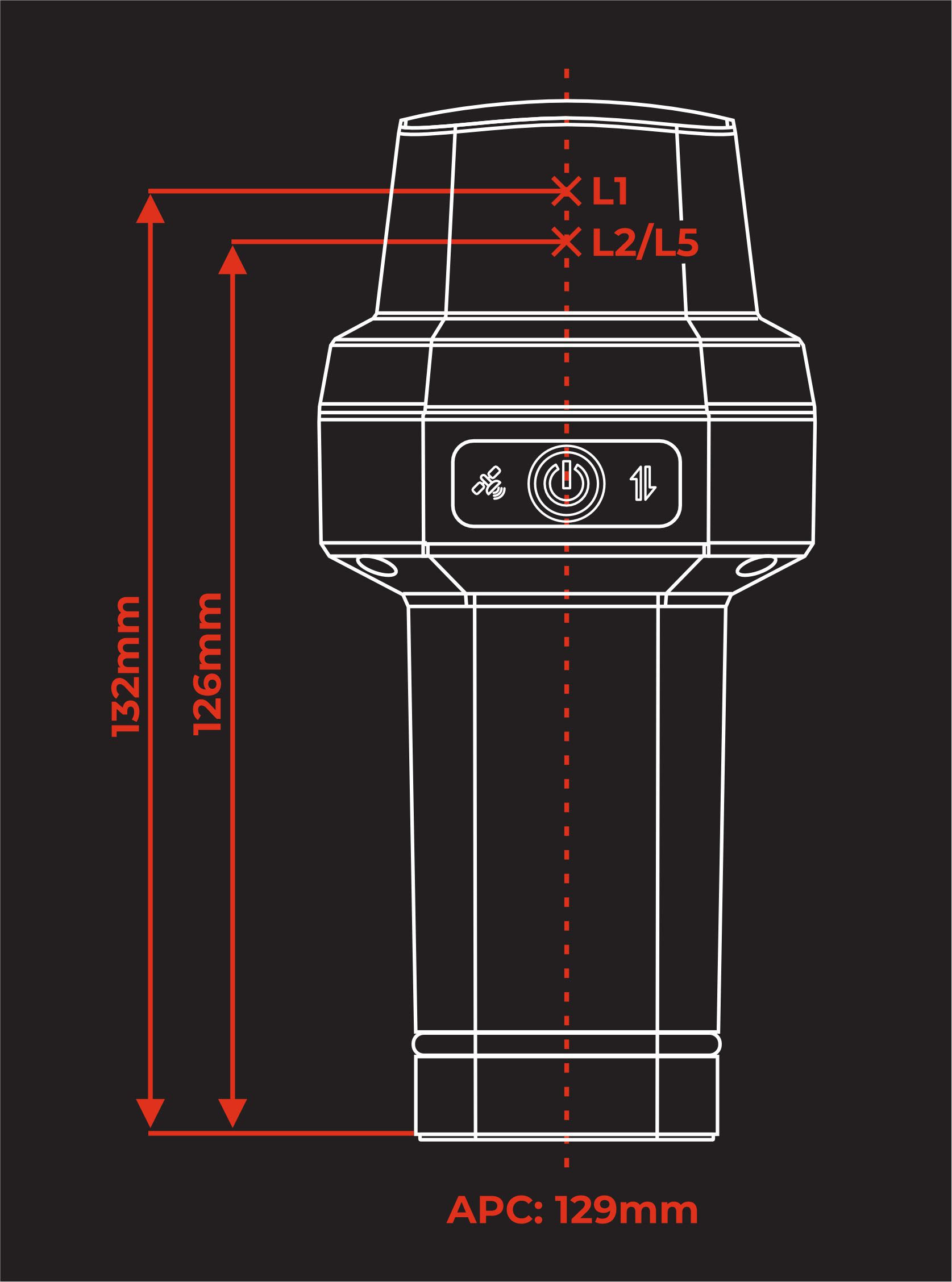
The mounting point at the bottom of the device, where the threaded insert is located serves as the device's ARP (antenna reference point). Additionally, the user interface's power button (front of the device) serves as the device's NRP (north reference point). The distance between the ARP on the TX2 to the L1 APC (antenna phase center) is 131.7mm and 126.2mm to the L2/L5 APC; with an average of 128.95mm.

Mount Point
The bottom of the TX2 features a standard 5/8"-11 TPI threaded insert. This is commonly found on surveying equipment and is compatible with most surveying poles. The TX2 kit also includes a 1/4" to 5/8" thread adapter for additional mounting options.

The center of the threaded insert, on the plane of the device's base, serves at the ARP (antenna reference point) for the device.
Power and Battery
Power Button
To power the device on or off, hold the power button down for more than 3 seconds. When the device powers on, it will beep once; whereas, the device will beep three times when it powers down.
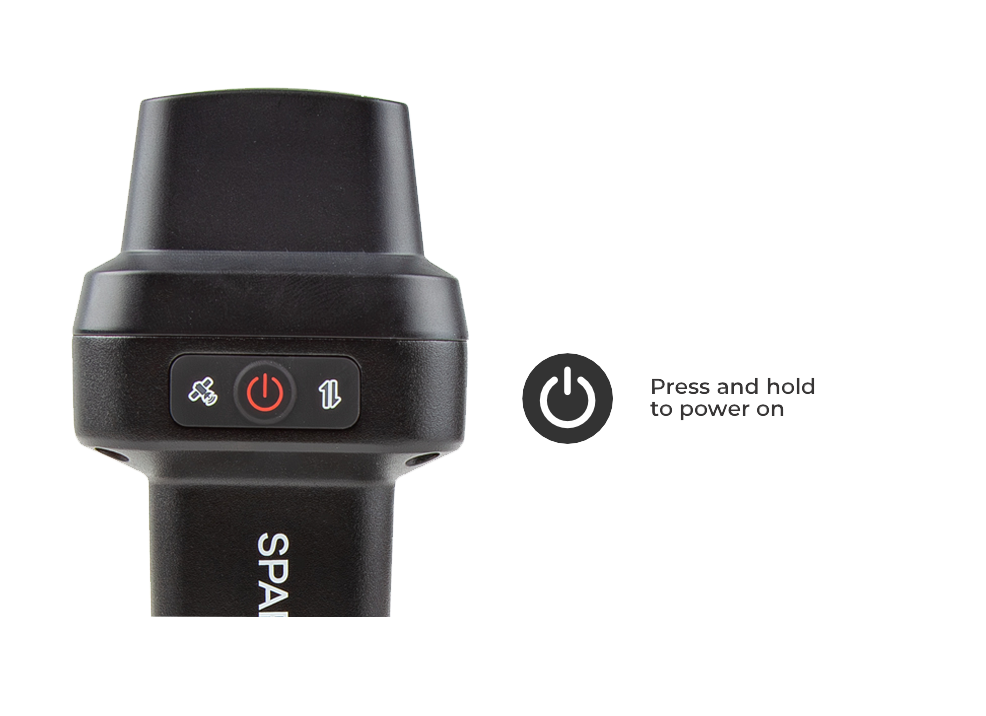
The center of the power button also serves at the NRP (north reference point) for the device.
Battery and Charging
The TX2 features a 49Whr battery and supports PD charging, up to 10W.

- Battery Charging - The TX2 supports PD charging up to 10W; this allows a fully discharged TX2 to be charged to 100% in a few hours. Users can access the USB-C port, under the rubber cover on the back of the device.
tip
Don't forget to fully close the rubber cover. The enclosure's IP67 ingress rating (waterproof to 1 meter, for up to 30 minutes), is only valid when the USB cover is closed.
- Battery Capacity - The TX2 includes a 7.2V 6.8Ahr (48.96Whr) battery. This should allow the device to run continuously for more than 50 hours, even in the worst-case conditions.
USB Port
Users can access the USB-C port, under the rubber cover on the back of the device.
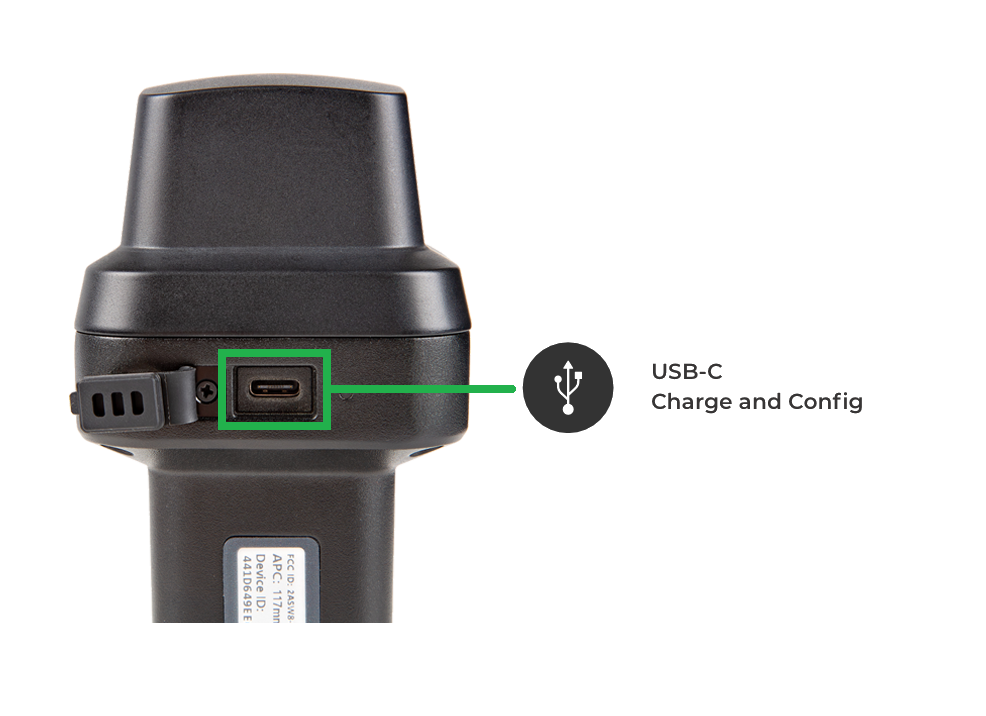
Don't forget to fully close the rubber cover. The enclosure's IP67 ingress rating (waterproof to 1 meter, for up to 30 minutes), is only valid when the USB cover is closed.
- In most cases, the USB-C post will be accessed to charge the battery. The TX2 supports PD charging up to 10W; this allows a fully discharged TX2 to be charged to 100% in a few hours.
- For more advanced users, this port can be utilized to configure the TX2, update the device and GNSS receiver firmware, and/or retrieve a diagnosis report for troubleshooting.
Indicators
The TX2 features simple visual indicators and an internal buzzer for audio feedback to the user.
Status LEDS
There are three LED status indicators on the TX2.
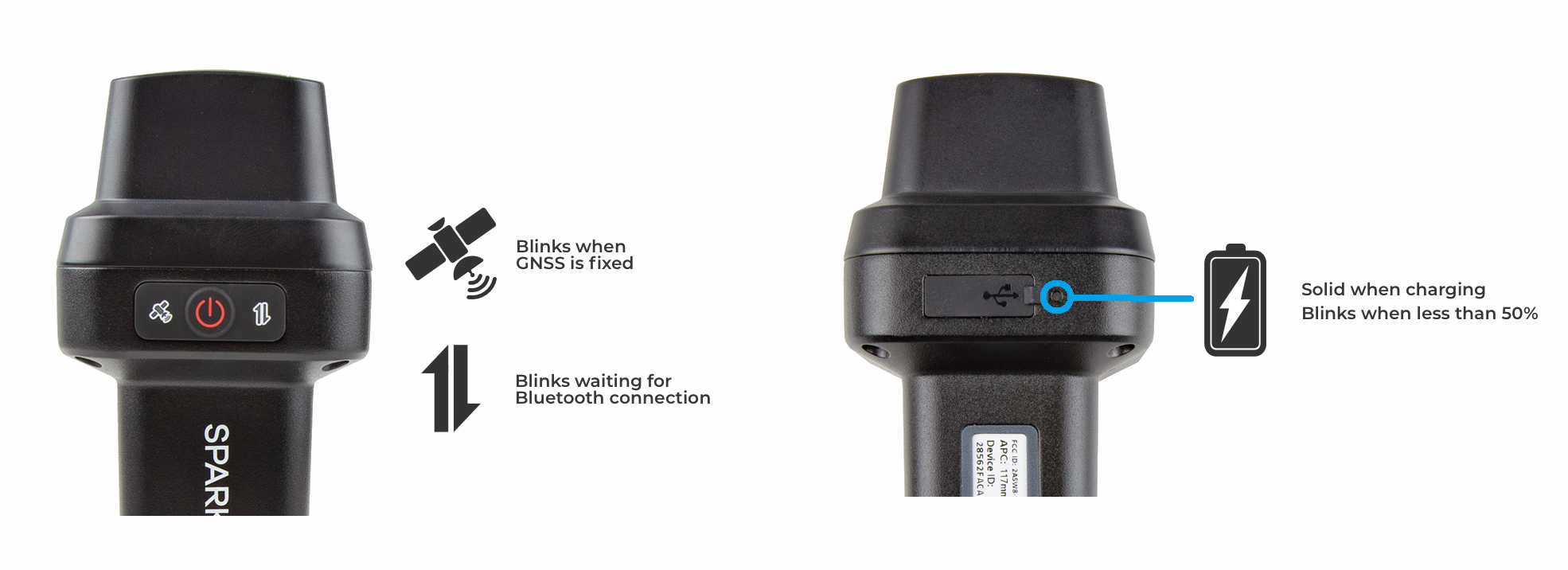
- The GNSS icon () indicates the GNSS solution status.
- A yellow LED will blink once per second when a GNSS fix is achieved.
- A green LED will illuminate solid when RTK Fix is achieved.
- The Connection icon () indicates the WiFi or BLE connection status.
- The LED blinks once per second while waiting for a connection.
- The LED will turn solid, once it is connected to a phone, laptop, WiFi network, etc.
- There is a small battery LED next to the cover of the USB port, on the back of the device.
- The LED is green when external power is supplied.
- When the device is on:
- The LED will be solid red indicating more than 50% battery capacity remains.
- The LED will blink red once per second, if less than 50% of the battery capacity remains.
Buzzer
The TX2 also includes an internal buzzer that provides audio feedback for the user. The following prompts are provided:
- Power On: Beep once
- Power Off: Beep three times
- Awaiting a Connection: Beep twice
Specifications
Below are the full specifications for this device:
- LG290P GNSS Receiver
- Supported Frequency Bands
- GPS: L1C/A, L1C, L2C, L5
- GLONASS: L1, L2
- Galileo: E1, E5a, E5b, E6
- Beidou: B1I, B2I, B3I, B1C, B2a, B2b
- QZSS: L1C/A, L1C, L2C, L5, L6
- NavIC: L5
- SBAS: L1
- Accuracy:
- Autonomous:
- Horizontal: 0.7m
- Vertical: 2.5m
- RTK:
- Horizontal: 8mm + 1ppm
- Vertical: 15mm + 1ppm
- Autonomous:
- Time to Fix: <28s
- Supported Frequency Bands
- Antenna
- L1, L2, L5, L6
- Gain: ≥2.3dBi
- APC (NGS Calibrated):
- L1: 131.7mm
- L2/L5: 126.2mm
- Average: 129.0mm
- WiFi, BLE
- 2.4GHz
- L1, L2, L5, L6
- Enclosure
- Ingress Protection: IP67 (1m of water for 30 minutes)
- Materials: Aluminum body w/ plastic cap
- Single push button control
- Three LED indicators
- USB-C port w/ rubber cover
- Battery
- Specs: 7.2V 6800mAh (48.96Whr)
- Charging: up to 10W
- Run Time: 50hrs
- Dimensions: 71 x 71 x 147mm (2.8 x 2.8 x 5.8in)
- Weight: 423g (0.93 lbs)