Enable Mock Location
Most GIS applications will gracefully handle the Bluetooth connection to the RTK device and provide an NTRIP Client for getting the RTCM corrections so this section can be skipped. If, in the rare case, a GIS app does not allow NTRIP corrections, Mock Locations can be enabled under Android. Then a data provider like Lefebure or GNSS Master can be used to act as a middle-man.
Before proceeding, it is recommended to have the mock location provider app already installed. So if you haven't already, consider installing Lefebure, GNSS Master, etc.
To enable Mock Locations, Developer Mode in Android must be enabled. It is best to google the most recent procedure for this but the following procedure should work:
- Open Android settings

- Open About phone
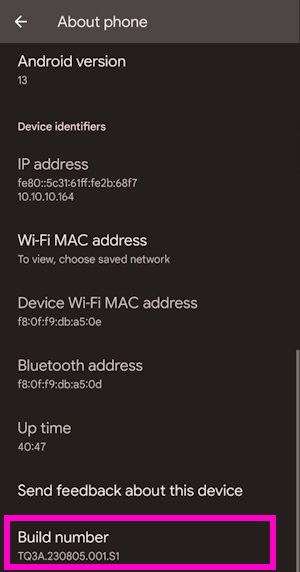
- Scroll to the bottom and click on Build number five or more times. The device will prompt as more taps are required.
Once Developer Mode is enabled:
- Open Android settings
- Open System
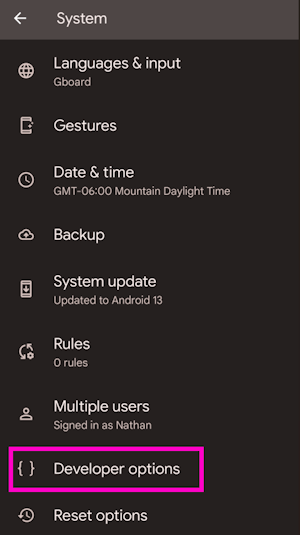
- Open Developer options
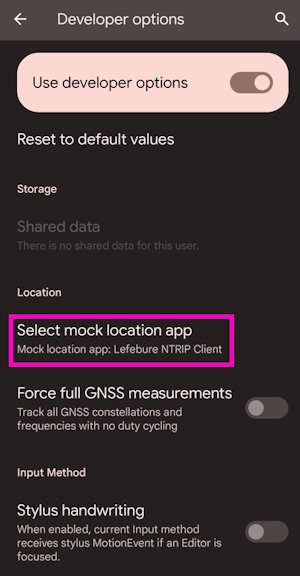
- Scroll all the way to the bottom of a very long list of developer options.
- Select the app to use for Mock Location. This is usually Lefebure or GNSS Master but can be tailored as needed.